When Sales Can See Customer Records but Not Payment Data and Support Can Query Tickets but Not Export Them
Granular permissions let teams access what they need without exposing sensitive data.

Least-privilege access control for internal database tools gives each team access to only the records, fields, and actions it needs to do its work. Role-based access, row-level security, and column masking let sales see their customers while keeping payment data out of view. With separate export permissions, support can read tickets without being able to download them in bulk.
Why non-technical teams can't get data access today — and why the obvious fix is dangerous
A sales rep wants to know whether a customer’s contract is active, but first has to file a ticket. A support agent needs to see order history and has to ask engineering to get it. Neither question calls for an analyst’s judgment. Yet both enter the same queue as work that does, because the person asking lacks a safe way to reach the answer. Engineering turns into the company’s very expensive information desk.
The tempting fix is broader database access. But with a single permission level, someone who can see the harmless contract status may also see payment data, personally identifiable information, and regulated records. The request was small. The grant is enormous. Locking everything down avoids that exposure but preserves the queue for sales, support, finance, and operations. The trap is treating access as a switch when the work calls for a set of boundaries.
What granular permissions actually are — and the three controls that compose them
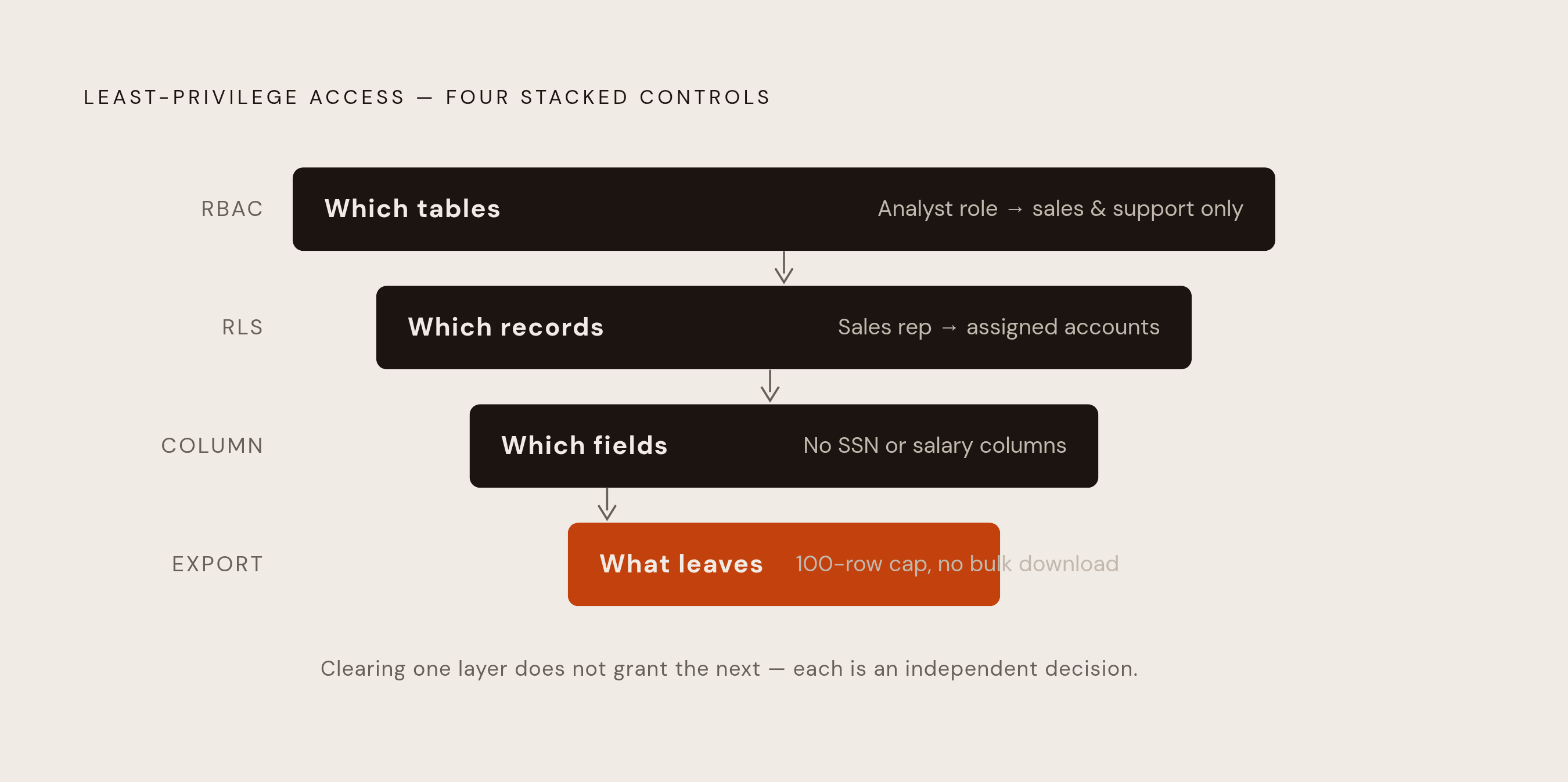
Role-based access control, or RBAC, establishes the first boundary. It identifies who is asking and determines which tables, dashboards, or data entities that role can reach. A Sales Manager and a Finance Analyst need different starting points. This is object-level access, meaning permission to reach a whole table or view.
Row-level security, or RLS, narrows access within those objects. It filters records according to the user’s identity, so an accessible customer table need not reveal every customer. Column-level security then hides or masks certain fields in the records the user is allowed to see. Those are three distinct decisions about access. A user can be allowed into a table, restricted to certain rows, and barred from reading sensitive columns in those rows.
Export controls add a separate decision about action. They govern what someone may take out, rather than which objects, rows, or fields someone may read. The enforcement location is crucial here. When row and column rules live in the database or data warehouse, downstream dashboards, SQL editors, and AI query interfaces can inherit the same boundaries. When rules apply only inside a BI dashboard, they do not protect data reached through direct database connections.
How row-level security lets sales see their customers and nothing else
For a sales rep, the useful permission refines “can read customers.” to “can read the customers assigned to this rep. An RLS policy maps the user’s identity, such as a user ID or assigned territory, to the records they are entitled to see. The database applies that filter to the query. The rep does not have to remember a filtering step, and forgetting one does not suddenly reveal another rep’s prospect.
A Sales Manager can receive a broader scope, such as all accounts in a region, while an individual contributor sees only their own book. Both can use the same table and dashboard. The policy sets each person’s access scope within the shared customer data. On PostgreSQL, database policies can enforce these restrictions using the user’s group membership. Queries cannot return rows that the applicable policy excludes.
That makes contract status, account history, and open opportunities available without an engineering ticket. What if the rep reaches the data through a different interface? With the filter enforced at the database layer under that user’s permissions, direct SQL, a dashboard, and a natural language query face the same restriction. Changing the entrance does not change which accounts belong to the rep.
How do you restrict which columns a non-technical team can see?
Sales may legitimately need the contract while having no business reason to read a stored payment method, card number, or billing address that PCI-DSS or company policy requires staying masked. RLS controls which rows are available. A customer relationship is not a backstage pass to payment data.
Column-level security supplies the missing boundary. Depending on the querying role, sensitive fields return asterisks, nulls, or another placeholder, or disappear from the result entirely. For example, a sales rep sees the account name, contract tier, renewal date, and assigned CSM, while payment_method and card_last_four are masked or absent. A Finance Analyst with permission sees those fields in full.
The same distinction applies beyond payments. HR can see salary data while managers see their direct reports’ bands and everyone else sees nothing. Account executives can see list prices without seeing cost or margin. Support can see a case ID without a diagnosis. In each example, permission follows the business purpose of the field, rather than assuming that access to one useful part of a record justifies access to all of it.
Why export controls are a separate and stricter problem for support teams
Support agents need ticket history to resolve customer problems. That does not mean they need a month of conversations in a downloadable file. Reading and bulk export are different powers. A departing employee exporting thousands of customer conversations represents a breach pattern described in the brief’s underlying scenario. The permission model therefore has to distinguish answering a customer from removing a collection of customer records.
Under that model, agents can query and read tickets in their assigned queue but cannot bulk-export ticket data or download attachments in aggregate. The person named as Privacy Administrator has the export right they need to fulfill data subject access requests. Audit logs record every view and every export attempt. These rights serve different jobs.
GDPR creates obligations in both directions. Organizations must restrict unauthorized bulk export while retaining the ability to produce a customer’s full data record on request. Disabling every export would solve only half the problem. Export must be granted on its own to roles allowed to use it, without being bundled with read access. A system can be helpful to a support agent without becoming a departure-lounge download service.
What happens when AI becomes the query interface — and why permissions must follow it
Once these boundaries exist, natural language querying puts them to a new test. A sales operations user who cannot write SQL can ask “show me all customer accounts with contracts expiring this quarter” and have an AI assistant generate and execute the query. The technical barrier has disappeared. The permission boundary must not disappear with it, because asking in plain English does not change which accounts or payment fields the person may see.
An AI interface that generates raw SQL may bypass filters or masks that exist only in the dashboard layer. The assistant need not be doing anything exotic. It may simply reach the database by a route that lacks those restrictions. So AI-generated queries need to follow the same policies as human-written queries, with the same row filters, column masks, and export limits.
For a team evaluating an internal tools platform, that makes permission inheritance a concrete buying criterion. The team needs to check that AI answers follow the platform’s row-level and column-level rules and use governed metric definitions. A friendly chat box is not enough. Before rollout, the recommended verification is to test AI-generated queries with a non-technical user account, rather than assuming that restrictions visible in a dashboard apply everywhere else. Permission follows the person.
The failure mode to plan for: when the permission model is too restrictive or too thin
The strongest objection is that granular governance can fail in either direction. A thin model masks the obvious secrets but leaves other information linked to them in view. Hiding card numbers, for example, still leaves spending patterns in view if people can see transaction amounts. Visible information can still reveal something the role should not know even when a field is concealed.
The reverse failure is a system that refuses most useful questions. Users go back to shadow spreadsheets, engineering tickets, or raw exports shared over Slack because they cannot get their work done through the approved route. A well-calibrated system should decline a small fraction of queries as unauthorized or unanswerable, while near-zero refusals can suggest weak governance and very high refusals suggest excessive restriction. The ungoverned self-service BI wave of the 2000s shows the other risk: broad access led to metric definitions that clashed, shadow datasets, and errors in analysis. Finer boundaries address both failures.
How to set this up in practice: what the engineering team configures and what users actually experience
To put the model into practice, the engineering team should first define roles against the organization’s structure. Sales Rep, Sales Manager, Support Agent, Privacy Administrator, and Finance Analyst each map to permitted tables, dashboards, and actions. Roles establish the basic shape of access. The team then writes database-level RLS policies keyed on user identity, group membership, or assigned territory, so that every query receives the appropriate row filter. PostgreSQL supports this enforcement natively in the database engine.
Next, column masks hide payment, salary, and personally identifiable information fields from roles that have not been given permission to read them. Finance or compliance roles receive full fields where their work requires them. Export gets its own configuration step. Bulk export and CSV download belong only to roles with a legitimate workflow requiring them, such as the administrator handling GDPR data subject requests. Read permission alone grants neither privilege.
Before rollout, the team should test natural language questions and AI-generated SQL using a non-technical user account. Those tests need to confirm that RLS and column masks apply beyond dashboard views, and that AI querying respects the same export restrictions. This is upfront configuration, rather than engineering work attached to every question. The user experience is much simpler than the setup. People log in, see the views relevant to their role, and ask questions in plain English or click through pre-built views without SQL, a ticket, or a wait.
The organizational result: what changes for each team once permissions are in place
For engineering and data teams, fewer ad hoc requests means more time to build and improve data infrastructure. Sales reps can look up account status, contract history, and renewal dates while managers can see only the book they are allowed to see, with other managers’ books kept out of view. Payment data remains outside the sales view. That boundary is enforced by the database. The speed comes from removing a dependency.
Support gains independence without gaining bulk-export rights. Agents can read their queue, the privacy administrator can produce authorized data subject exports, and audit logs show who accessed what and when. At company level, this changes how access scales. A 100-person company can build a data culture without a dedicated BI or internal-tools team, because each new person need not bring a new stream of requests for engineering. True self-serve access is not the whole database thrown open, but the relevant slice made safely available to the team that needs it.